Visitor Management
A visitor walks in at your organisation? Do they still sign a paper register at the desk? Can your reception team tell you, right now, how many people are inside the building? And if you needed to know a visitor's details from three weeks ago, how long would that take? A Visitor Management System is the digital way to handle all this.

What Is FTpass Visitor Management System?
FTpass VMS or Visitor Management System, is a digital platform that helps organisations register, verify, approve, track, and manage visitors entering their premises, all while ensuring the full security of your organisation.
At its core, the process follows a simple flow:
- Register
- Verify
- Approve
- Check In
- Monitor
- Check Out
How Does FTpass VMS Work?
Visitor Registration
Visitors can register through pre-registration links, web forms, mobile devices, QR codes, reception desks, or self-service kiosks.
Identity & Verification
Visitor information can be verified using QR codes, AI-powered face detection, ID checks, or document verification based on organisational requirements.
Host Approval
Hosts receive notifications when visitors check in and can approve or decline visits, with multi-level approval workflows available for larger organisations.
Visitor Check-In
Once approved, visitors can receive a digital or physical pass while their entry details are recorded automatically.
Monitor & Check Out
Security and reception teams can monitor active visitors through a dashboard, while visitor exits are recorded and complete visit reports remain available for later use.
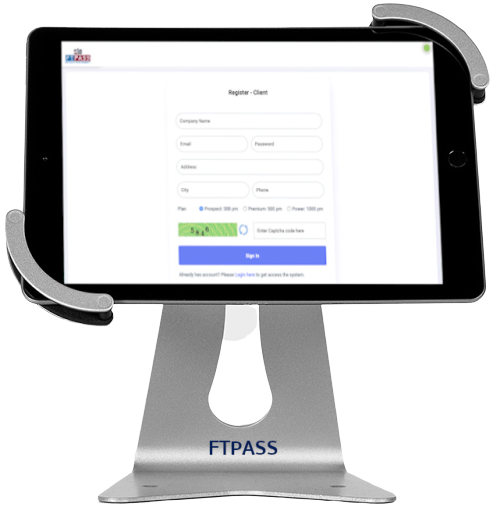
Visitor Management Kiosk (Self-Service)
A self-service kiosk lets the visitor handle their own check-in. They enter or scan their details themselves, without waiting for someone at the desk to type it in.
Here is what a kiosk typically does for you:
- QR-based check-in that shortens waiting time
- Less repetitive work for your reception staff
- A consistent, standard check-in process every single time
- Support for touchless entry, which many organisations prefer now
- Easy placement right at the entrance or reception area
FTPASS supports tablet-powered kiosk-based visitor check-in, which lets organisations offer a faster, more touchless entry experience without adding extra manpower at the gate.
Key Features of Visitor Management
Visitor Registration
Visitors can register their details digitally before or at the gate, eliminating paper-based visitor registers.
Check-In and Check-Out
Visitor entry and exit are recorded digitally, providing accurate information about time spent on the premises.
Visitor Pass or Badge Generation
Approved visitors can receive digital or printed passes for easy identification within the premises.
Host Notifications
Hosts can receive instant notifications when their visitors arrive at the reception or gate.
Appointment Management
Hosts can schedule visitor appointments in advance and prepare for expected visits.
Visitor History and Records
Previous visitor information can be accessed quickly whenever historical records are required.
Live Monitoring
Security and reception teams can view real-time information about visitors currently inside the premises.
Reports and Logs
Visitor reports and activity logs can be accessed whenever required for audits, compliance, or administrative purposes.
Visitor Management System for Different Workplaces
No two premises have the same visitor pattern, so requirements naturally change depending on the environment.
Offices & Enterprises
Organizations can manage clients, vendors, interview candidates, contractors, and employee guests through a centralized visitor management system.
Hospitals
Hospitals can manage high visitor volumes, department-specific visits, patient-related visitors, security-sensitive areas, and visitor approval processes.
Schools & Institutions
Educational institutions can manage parents, vendors, guests, staff visitors, and event attendees while maintaining organized visitor records.
Manufacturing & Industrial Facilities
Industrial facilities can track contractors, vendors, drivers, service personnel, and visitors requiring access to restricted areas.
Residential Societies
Residential communities can manage guests, delivery personnel, service providers, and domestic workers with structured visitor registration and access records.
Why Choose FTpass for Visitor Management?
A visitor management platform should not force every organisation into the same workflow. Different facilities have different entry points, approval chains, and security needs. With FTpass, organisations can:
Configure Locations and Entry Points
Set Approval Rules and User Roles
Enable QR, Kiosk, and Touchless Check-Ins
Use AI-Powered Face Detection and Validations
Send Real-Time Alerts to Hosts
Monitor Visitor Activity Through a Central Dashboard
Generate Reports and Maintain Full Visitor History
Integrate Face Recognition, Biometrics, and Swing Barriers
Choose Cloud or On-Premises Deployment
Customise Workflows to Match Organisational Processes
Do You Even Need a Digital Visitor Management System?
It is easy to think this is just about saving paper. But that misses the bigger point. Knowing who enters your premises is a basic part of controlling access to your organisation.
Major demerits of manual register system
A visitor management system does more than record a name. It creates a structured record of:
How Can I Get Started?
Getting started with FTpass is simple and does not require any heavy setup on your end. Just contact the FTpass team through the contact page. Share your visitor volume and security needs. Book a free demo to see how it works. And then we will also give you a 2-weeks FreeTrial.